iPhone Duo screenshot sizes and export specifications
Duo Studio renders the iPhone Duo inner screen at 2853 × 2007 pixels in landscape — a 1.42:1 aspect ratio — and 2007 × 2853 pixels in portrait, and the outer screen at 1398 × 2034 pixels, or 2034 × 1398 pixels for the standing pose. These are the exact dimensions used by the tool’s screenshot slots and scene-native exports. Every specification on this page — slot dimensions, pose list, export formats, resolutions, frame rates and input limits — was measured from the shipped application rather than copied from third-party summaries.
What screenshot sizes should I prepare?
| Screen | Used by pose | Recommended pixels | Aspect |
|---|---|---|---|
| Inner, landscape | Unfold, Landscape | 2853 × 2007 | 1.42:1 |
| Inner, portrait | Portrait, Seated | 2007 × 2853 | 1:1.42 |
| Outer, portrait | Closed | 1398 × 2034 | 1:1.45 |
| Outer, landscape | Standing | 2034 × 1398 | 1.45:1 |
Without a separate outer-screen image, Duo Studio derives the outer view from the left half of an inner screenshot. Each screen offers Fit and Fill modes with adjustable position and 1–2× zoom, so images that do not match the aspect ratio can still be framed.
Which poses does Duo Studio render?
| Pose | Screen displayed | Fold state |
|---|---|---|
| Unfold | Inner, landscape | Partially open |
| Closed | Outer, portrait | Fully closed |
| Landscape | Inner, landscape | Fully open |
| Portrait | Inner, portrait | Fully open |
| Seated | Inner, portrait | About half open |
| Standing | Outer, landscape | Slightly open |
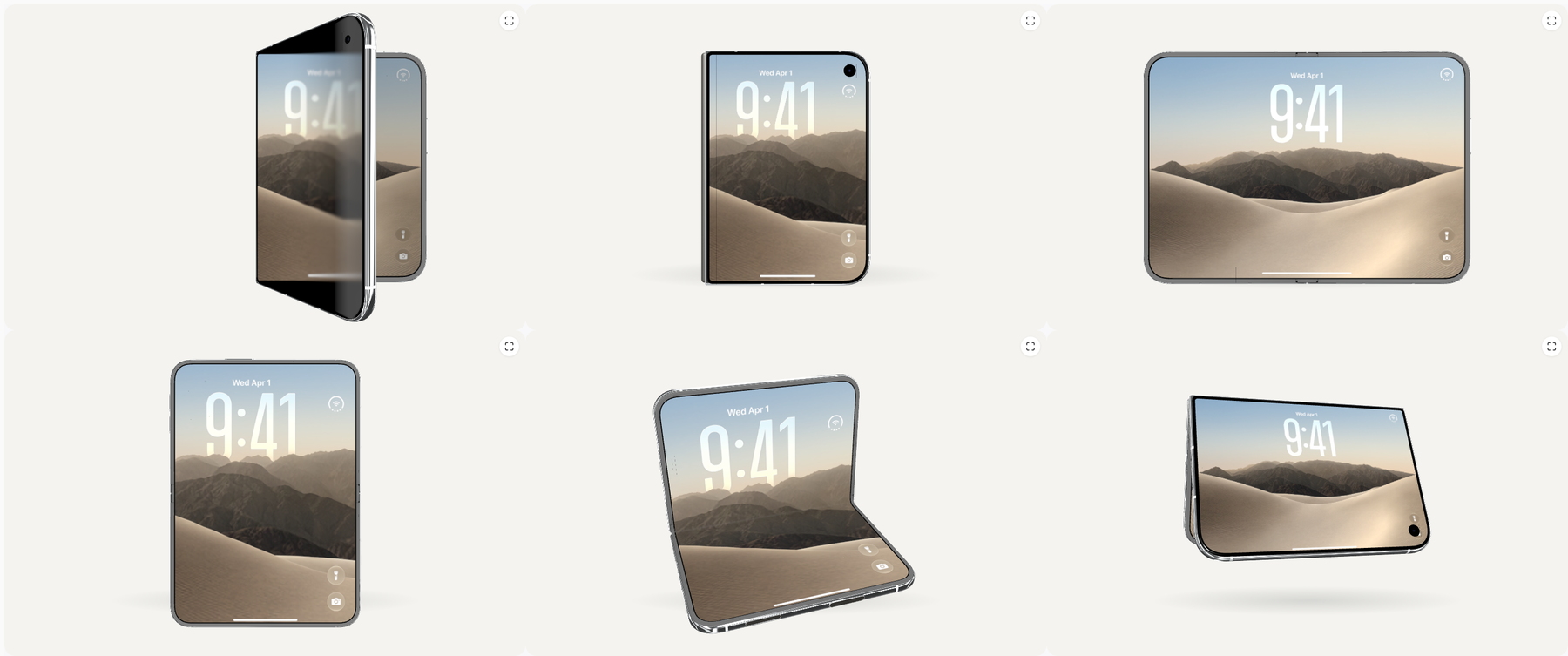
What export formats and sizes are available?
| Format | What you get | Resolution and frame rate | Notes |
|---|---|---|---|
| PNG still | Framed mockup at the selected output size | Scene-native up to 2853 × 2007, Wide 1600 × 1000, Tall 1080 × 1350 or Square 1200 × 1200 | Transparent background optional |
| MP4 animation | H.264 folding animation | 30 fps, longest side up to 1280 px | Needs browser H.264 encoding |
| WebM animation | VP9 folding animation | 30 fps, longest side up to 1280 px | Needs browser VP9 encoding |
| GIF loop | Looping folding animation | 12 fps, longest side up to 640 px | 128-colour palette |
| Scene bundle ZIP | One PNG per screen slot plus a manifest | Native slot dimensions, e.g. 2853 × 2007 | Builds a complete screenshot set |
| Raw UI PNG | An uploaded screen image, unframed | Must match the slot size exactly, e.g. 1398 × 2034 | Confirms exact-size sources |
What inputs and limits apply?
- Screenshots: PNG, JPEG or WebP, up to 4096 pixels per side.
- Browser simulation: any embeddable website URL, rendered at 1×, 2× or 3× pixel ratio.
- Animations: 2–10 seconds with optional 0–2 second holds at each end, smooth or linear easing.
- Projects: autosaved in the browser, portable as .duo.json files.
- Everything is processed locally; screenshots are never uploaded.
Where do these numbers come from?
The device model ships in the open-source iPhoneDuoMock repository and is built from Apple’s official iPhone Duo webpage assets, with attribution in the repository. Duo Studio is an independent project and is not affiliated with Apple. Mockups do not prove real-device compatibility or App Store acceptance — check current App Store Connect requirements before submitting.